

My Account
The My Account section lets you manage your personal information, security settings, and communication preferences. Access it by clicking your profile menu in the top-right corner and selecting My Account.
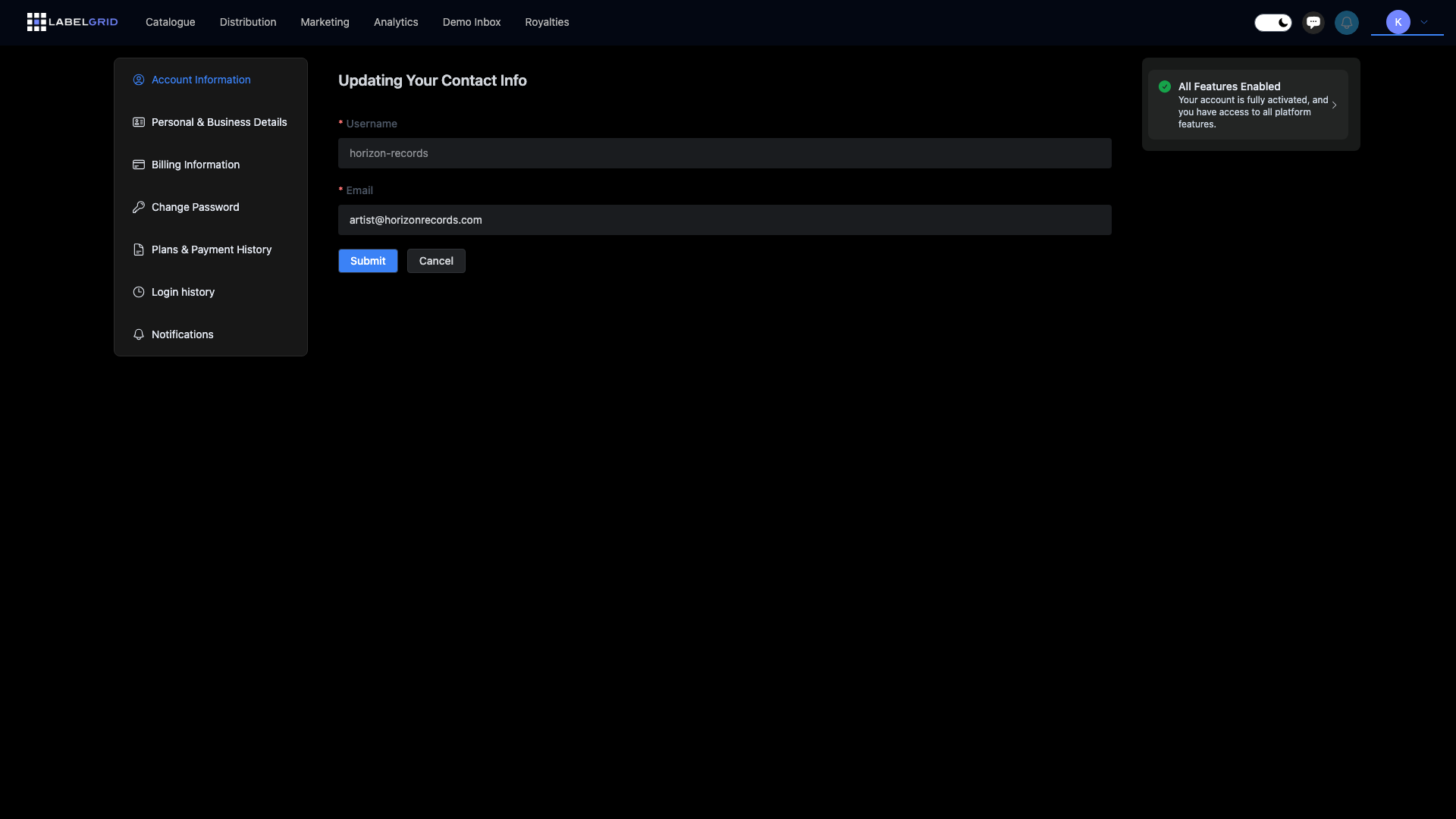
My Account Navigation
Section titled “My Account Navigation”When you open My Account, you’ll see a sidebar with these sections:
| Section | Description |
|---|---|
| Account Information | Your username and email address |
| Personal & Business Details | Your personal info, company details, and tax forms |
| Billing Information | Payment details for receiving royalties |
| Change Password | Update your account password |
| Plans & Payment History | Manage your subscription plan |
| Login History | View login activity on your account |
| Notifications | Email communication preferences |
| API Tokens | Manage API access (if enabled) |
| Webhooks | Configure event notifications (if enabled) |
Account Information
Section titled “Account Information”View and update your basic account details:
- Go to your profile menu (top-right corner)
- Select My Account
- Click Account Information in the sidebar
This page shows:
- Username - Your account username (cannot be changed)
- Email - Your email address (can be updated)
Changing Your Email
Section titled “Changing Your Email”- Enter your new email address in the Email field
- Click Submit
- Check your new email for a verification link
- Click the link to confirm the change
Social Account Connection
Section titled “Social Account Connection”If you signed up using Google or Facebook, you’ll see an option to disconnect your social account. This allows you to switch to email-based login.
Personal & Business Details
Section titled “Personal & Business Details”Complete your personal and business information to enable all platform features, including receiving royalty payments.
- Go to your profile menu (top-right corner)
- Select My Account
- Click Personal & Business Details in the sidebar
You’ll see cards for each required step:
Personal and Business Details
Section titled “Personal and Business Details”Enter your personal information and company details (if applicable). This information is used for:
- Account records
- Tax reporting
- Compliance purposes
Tax Forms
Section titled “Tax Forms”Based on your location and business type, you’ll need to complete the appropriate tax form:
| Form | Who Needs It |
|---|---|
| W-9 | US-based individuals and businesses |
| W-8BEN | Non-US individuals |
| W-8BEN-E | Non-US companies and entities |
Only the relevant form for your situation will be displayed. See Tax Information for detailed instructions.
Personal Identity Verification (KYC)
Section titled “Personal Identity Verification (KYC)”All accounts must complete identity verification (KYC) to fully activate their account. Until KYC is complete, you cannot distribute releases or receive payments. This is a regulatory requirement that protects you and ensures compliance with financial regulations.
The verification process includes:
- Upload a government-issued ID (passport, driver’s license, or national ID)
- Complete a selfie verification
- Wait for processing (typically completed within minutes)
For complete details on the verification process, see Account Verification.
Billing Information
Section titled “Billing Information”Set up how you receive royalty payments.
- Go to your profile menu (top-right corner)
- Select My Account
- Click Billing Information in the sidebar
Payment Details
Section titled “Payment Details”Add your bank account or payment method for receiving royalties. You’ll need:
- Bank name and account details
- Routing information (varies by country)
- Account holder name matching your verified identity
Change Password
Section titled “Change Password”Update your account password for security:
- Go to your profile menu (top-right corner)
- Select My Account
- Click Change Password in the sidebar
- Enter your new password
- Confirm your new password
- Click Submit
The password strength indicator shows how secure your password is as you type. Aim for a strong rating.
Strong password tips:
- At least 12 characters
- Mix of uppercase and lowercase letters
- Include numbers and symbols
- Not used on other sites
- Not based on personal information
Plans & Payment History
Section titled “Plans & Payment History”Manage your subscription and view payment history. See Subscription & Billing for detailed information about:
- Available plans
- Upgrading or downgrading
- Payment history
- Billing details
Login History
Section titled “Login History”Monitor all login activity on your account:
- Go to your profile menu (top-right corner)
- Select My Account
- Click Login History in the sidebar
The login history table shows:
| Column | Description |
|---|---|
| IP Address | The IP address used to access your account |
| Country | The country where the login originated |
| State | The state/region of the login location |
| City | The city of the login location |
| First Login | When this device/location first accessed your account |
| Last Login | The most recent login from this device/location |
Notifications
Section titled “Notifications”Control what email communications you receive from LabelGrid:
- Go to your profile menu (top-right corner)
- Select My Account
- Click Notifications in the sidebar
You can configure these options:
| Setting | Description |
|---|---|
| Receive tips | Get helpful tips on how to use LabelGrid features effectively |
| Receive news | Stay informed about LabelGrid news, feature updates, and announcements |
| Unsubscribe from all | Opt out of all non-essential emails |
Click Submit to save your preferences.
API Tokens
Section titled “API Tokens”If your account has API access enabled, you can manage your API tokens:
- Go to your profile menu (top-right corner)
- Select My Account
- Click API Tokens in the sidebar
From here you can:
- Generate new API tokens
- View existing tokens
- Revoke tokens
See API Overview for more information about using the LabelGrid API.
Webhooks
Section titled “Webhooks”If your account has API access enabled, you can configure webhooks to receive real-time notifications:
- Click your profile icon in the top-right corner
- Select Webhooks from the dropdown menu
Webhooks allow you to automate workflows by receiving notifications when events occur, such as:
- Releases being delivered to stores
- Delivery failures
- Payment statements ready
See Webhooks for complete setup and configuration instructions.
Need Help?
Section titled “Need Help?”If you need assistance with your account, contact our support team.
Not using LabelGrid yet?
Everything you just read about is available on our platform.
See what LabelGrid can do →