

Advanced Date Settings
This guide explains LabelGrid’s advanced date controls for territory-specific release scheduling, pre-orders, and timed availability.
Audience: This feature is primarily for labels and advanced users who need granular control over release timing across different regions.
Enabling Advanced Date Controls
Section titled “Enabling Advanced Date Controls”In the Date Settings tab of your release:
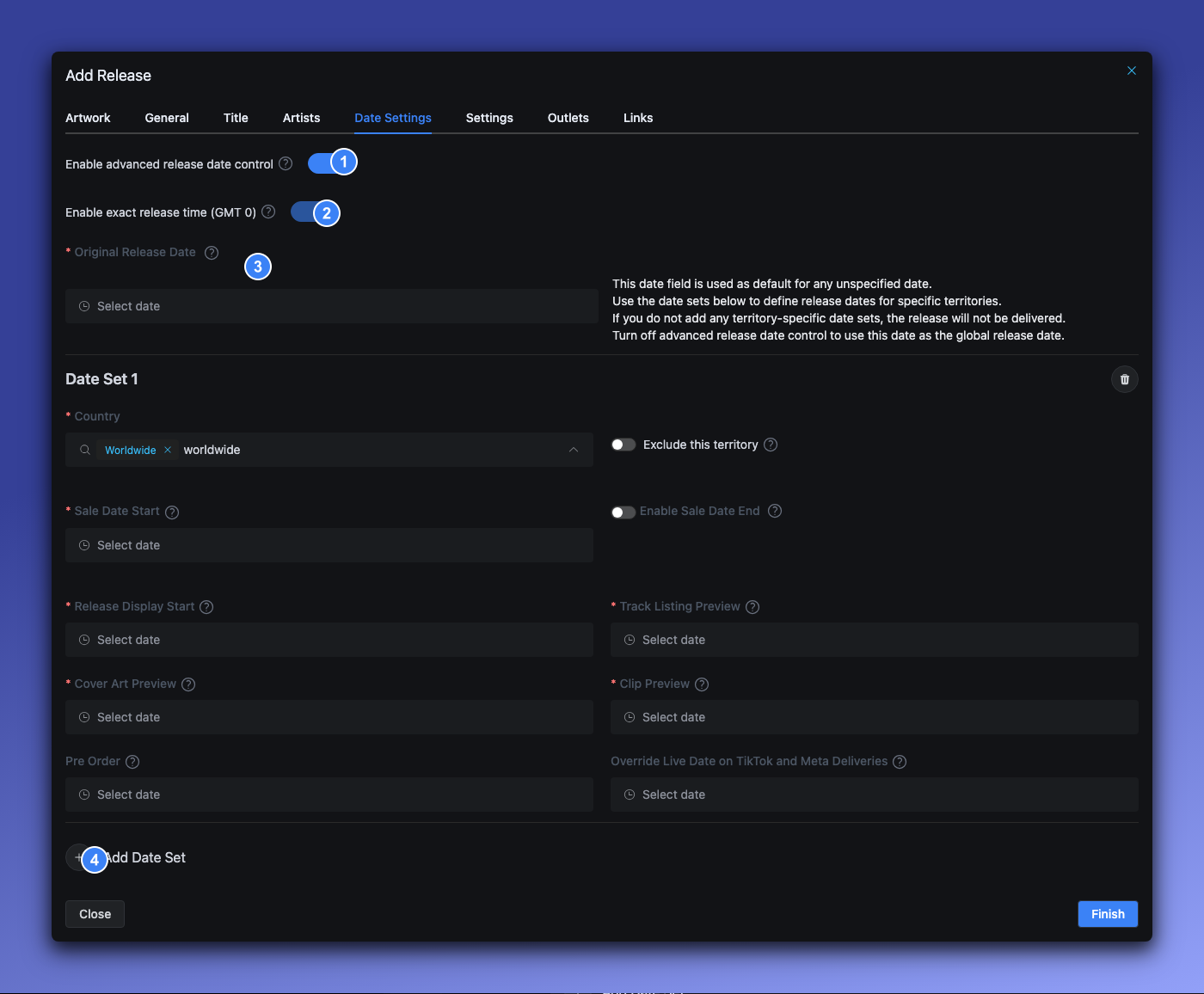
- Enable advanced release date control - Toggle this ON to access territory-specific date options. This automatically enables exact release time (GMT 0).
- Enable exact release time (GMT 0) - When advanced dates are enabled, this is always ON. All date fields include a time picker in GMT 0.
- Original Release Date - The default date used as a fallback for any fields you don’t set in your date sets. If you don’t add any date sets, the release will not be delivered.
- Add Date Set - Click to add territory-specific release dates with custom settings
Basic Date Fields
Section titled “Basic Date Fields”Original Release Date
Section titled “Original Release Date”The main date when your release becomes available for streaming and purchase.
| Rule | Description |
|---|---|
| Format | Date only, or date with time |
| Past dates | Automatically adjusted to today |
| Minimum lead time | Recommend 7-14 days for playlist consideration |
Pre-Save / Pre-Order Date
Section titled “Pre-Save / Pre-Order Date”When fans can pre-save (streaming) or pre-order (purchase) before the release date.
| Rule | Description |
|---|---|
| Must be before | The release date |
| Apple Music limit | Maximum 366 days before release |
| Spotify pre-save | Available once release is approved |
What happens during pre-order period:
- Cover art becomes visible
- Track listing may be visible (configurable)
- 30-second previews may be available (configurable)
- Fans can save to their library for release day
Territory-Specific Dates
Section titled “Territory-Specific Dates”Advanced date control allows you to set different release dates and settings per country or region.
You don’t need to list individual countries
Section titled “You don’t need to list individual countries”You can use WW (worldwide) as the country to apply settings to all territories at once. This is useful when you want access to the advanced fields — like Override Live Date on TikTok and Meta, Sale Date End, or detailed preview dates — without needing a per-country setup.
A single date set with WW is all you need for a global release with advanced options.
Why use territory-specific dates?
Section titled “Why use territory-specific dates?”If you do need per-country control, common reasons include:
- Staggered rollouts - Release in some markets before others
- Regional promotions - Align with local marketing campaigns
- Contractual requirements - Meet territory-specific agreements
- Timed exclusives - Give certain regions early access
- Territory exclusions - Block specific countries using the Exclude this territory checkbox
Date set fields
Section titled “Date set fields”Each date set contains the following fields:
| Field | Required | Purpose |
|---|---|---|
| Country | Yes | ISO country codes (e.g., US, GB, DE) or WW for worldwide. You can select multiple countries per date set. |
| Exclude this territory | No | Checkbox — when enabled, this territory is excluded from all deliveries. All date fields are hidden. |
| Sale Date Start | Yes | When the release goes live for streaming and purchase in this territory |
| Enable Sale Date End | No | Toggle — enable to set an end date for the release in this territory |
| Sale Date End | If enabled | When to remove the release from stores in this territory. Must be after Sale Date Start. |
| Release Display Start | Yes | When the release appears in store catalogs for consumers to see |
| Track Listing Preview | Yes | When the track list becomes visible to consumers |
| Cover Art Preview | Yes | When the cover art becomes visible to consumers |
| Clip Preview | Yes | When audio previews (30-second clips) become available to consumers |
| Pre Order | No | When the release becomes available for pre-orders in this territory |
| Override Live Date on TikTok and Meta Deliveries | No | A separate date for when your content goes live on TikTok and Meta (Facebook/Instagram) |
Exclude this territory
Section titled “Exclude this territory”The Exclude this territory checkbox lets you block your release from specific countries without having to list every other country individually.
How it works:
- Add a date set and select the countries you want to exclude
- Enable the Exclude this territory checkbox
- The release will not be delivered to those countries
Example — Release everywhere except Germany and France:
Date Set 1:
- Countries:
WW - Sale Date Start: February 28, 2025
Date Set 2:
- Countries:
DE,FR - Exclude this territory: enabled
This is much simpler than listing every country you do want to release in.
Enable Sale Date End
Section titled “Enable Sale Date End”The Enable Sale Date End toggle controls whether your release has a removal date in a specific territory. This is off by default.
When enabled, a Sale Date End date picker appears. On that date, the release will be taken down from stores in the selected territory.
Use cases:
- Limited-time releases
- Seasonal content
- Licensing windows expiring
- Exclusive territory windows
Override live date on TikTok and Meta
Section titled “Override live date on TikTok and Meta”The Override Live Date on TikTok and Meta Deliveries field lets you control when your release becomes available on TikTok and Meta (Facebook and Instagram) independently from other platforms.
Why use this? If you’re planning social media promotion that uses your release content (e.g., Instagram Reels, TikTok videos), you may want your music available on these platforms before the official release date — while keeping it off streaming services until the full release.
How to use it:
- Enable Advanced release date control
- Add a date set with WW (worldwide) or your target countries
- Set the Override Live Date on TikTok and Meta Deliveries to your preferred date
Example: Your release date is February 28, but you want the music available on TikTok and Instagram for creator promotion starting February 14. Set the override live date to February 14 — your release stays off Spotify, Apple Music, etc. until February 28, but TikTok and Meta get it on February 14.
Country codes
Section titled “Country codes”Use ISO 3166-1 alpha-2 codes:
| Code | Country |
|---|---|
US | United States |
GB | United Kingdom |
DE | Germany |
FR | France |
JP | Japan |
AU | Australia |
WW | Worldwide (all territories) |
Example: Staggered international release
Section titled “Example: Staggered international release”Release in the US first, then worldwide one week later:
Date Set 1:
- Countries:
US - Sale Date Start: January 15, 2025
Date Set 2:
- Countries:
WW - Sale Date Start: January 22, 2025
Timed Releases and Takedowns
Section titled “Timed Releases and Takedowns”Scheduling a takedown by date
Section titled “Scheduling a takedown by date”To automatically remove your release from a territory on a specific date:
- In the date set, toggle Enable Sale Date End
- Set the Sale Date End date
- The release will be removed from stores in that territory on that date
Excluding a territory entirely
Section titled “Excluding a territory entirely”To prevent your release from being delivered to specific countries:
- In the date set, select the countries to exclude
- Enable the Exclude this territory checkbox
- The release will not be delivered to those countries at all
Important notes on takedowns
Section titled “Important notes on takedowns”- Takedowns are processed within 24-48 hours of the end date
- Some platforms may take longer to fully remove content
- Streaming counts stop accumulating after takedown
Pre-Order Configuration
Section titled “Pre-Order Configuration”iTunes/Apple Music pre-order rules
Section titled “iTunes/Apple Music pre-order rules”| Rule | Limit |
|---|---|
| Maximum pre-order period | 366 days |
| Minimum pre-order period | No minimum |
| Pre-order pricing | Set at release level |
Auto-adjustment: If your pre-order date exceeds 366 days before release, LabelGrid automatically caps it at the maximum allowed.
What’s available during pre-order
Section titled “What’s available during pre-order”| Content | Configurable? |
|---|---|
| Cover art | Yes - set cover art preview date |
| Track listing | Yes - set track listing preview date |
| Audio clips (30 sec) | Yes - set clip preview date |
| Full tracks | No - only available after release |
Midnight Release Timing
Section titled “Midnight Release Timing”Enable exact release time
Section titled “Enable exact release time”Toggle Enable exact release time (GMT 0) to control the precise moment your release goes live.
Default behavior (off):
- Release goes live at midnight local time in each territory
- US gets it at midnight EST
- UK gets it at midnight GMT
- etc.
With exact time enabled:
- Release goes live at the specified time globally (GMT)
- All territories receive it simultaneously
When to use exact timing
Section titled “When to use exact timing”- Global premieres with live events
- Coordinated worldwide marketing campaigns
- Competition for chart positions (same-moment release)
Redistribution Rules
Section titled “Redistribution Rules”Fields that trigger redistribution
Section titled “Fields that trigger redistribution”Changing these fields on an already-distributed release will:
- Reset status to DRAFT
- Require resubmission for review
- Trigger redistribution to all DSPs
| Field | Triggers Redistribution |
|---|---|
| Release Date | Yes |
| Pre-Order Date | Yes |
| Territory Dates | Yes |
| Title | Yes |
| Artist | Yes |
| Barcode | Yes |
| P-Line / C-Line | Yes |
Platform-Specific Considerations
Section titled “Platform-Specific Considerations”Spotify
Section titled “Spotify”- Pre-save available after approval
- Requires 7-day advance notice for editorial playlist consideration
- Midnight local time releases by default
Apple Music / iTunes
Section titled “Apple Music / iTunes”- Maximum 366-day pre-order window
- Supports pre-order pricing
- Exact release time supported
Beatport
Section titled “Beatport”- Longer processing times (3-7 business days)
- Genre-specific release schedules
- Friday release standard for dance music
TikTok and Meta (Instagram & Facebook)
Section titled “TikTok and Meta (Instagram & Facebook)”- Supports a separate Override Live Date per territory date set
- Use this to make your music available for social media promotion before the official release
- Useful for creator campaigns, Instagram Reels, and TikTok videos
YouTube Music
Section titled “YouTube Music”- Content ID processing may take additional time
- Midnight releases in primary territory
Best Practices
Section titled “Best Practices”For singles
Section titled “For singles”- Lead time: 2-3 weeks minimum
- Pre-save: Enable 1-2 weeks before release
- Territory: Usually worldwide simultaneous
For albums
Section titled “For albums”- Lead time: 4-6 weeks minimum
- Pre-order: 2-4 weeks before release
- Single releases: Consider releasing singles leading up to album
For time-sensitive releases
Section titled “For time-sensitive releases”- Breaking news/current events: Minimum processing time possible
- Coordinated campaigns: Use exact release time
- Chart competition: Align with chart calculation periods (usually Friday)
Troubleshooting
Section titled “Troubleshooting””Pre-order date must be before release date”
Section titled “”Pre-order date must be before release date””Your pre-order date is set after your release date. Adjust so pre-order comes first.
”Pre-order period exceeds maximum”
Section titled “”Pre-order period exceeds maximum””Apple Music limits pre-orders to 366 days. Either:
- Move release date closer, or
- Move pre-order date later
Release not live at expected time
Section titled “Release not live at expected time”- Processing takes 2-7 days after approval
- Check each platform individually
- Some platforms have additional review processes
Territory-specific release not appearing
Section titled “Territory-specific release not appearing”- Verify country codes are correct
- Check the Sale Date Start is set
- Make sure Exclude this territory is not accidentally enabled
- Confirm the release is approved and distributed
Related guides
Section titled “Related guides”- Creating a Release - Basic release setup
- Supported Stores - Available distribution outlets
- Monitoring Deliveries - Monitor your release
Need help with complex scheduling? Contact our support team
Not using LabelGrid yet?
Everything you just read about is available on our platform.
See what LabelGrid can do →